Platform Overview
Discover the powerful features and capabilities that make Nimbuz your ideal cloud platform for deployment, scaling, and innovation.
Nimbuz Architecture
Nimbuz is a unified platform for modern app and infrastructure management combining secure configuration, seamless releases, built-in observability, and scalable operations to empower confident delivery.
Core Components
Switch Component
The switch component is available across all screens to rapidly switch the project, region and environment without navigating to the projects screen.
The user will be able to switch the project or region or environment by clicking on "Switch" as shown:

For instance, "neat-graceful" here is the project in the region "ap-south-1" having the environment "default-2".
To quickly switch to another project, the user can click on Switch button and the below screen appears:
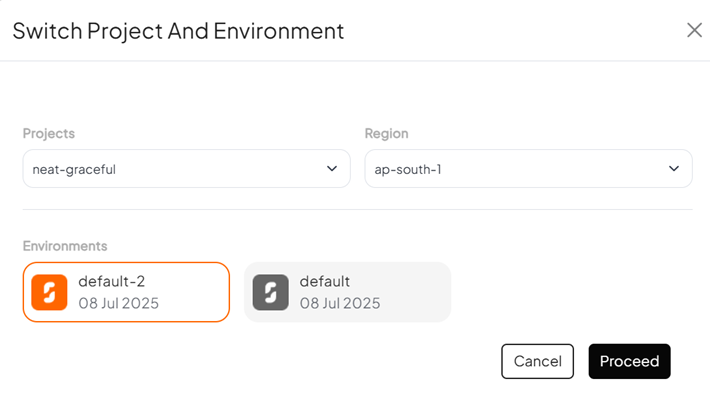
The user can select any available project from the projects dropdown, or select a region and environment and click on proceed. The dashboard metrics, deployments and tools will be loaded based on the selection.
Dashboard
Your central control hub for managing all Nimbuz resources:
- Project Management: Organize your applications and services
- Resource Monitoring: Real-time metrics and analytics
- Team Collaboration: Manage users, roles, and permissions
- Billing & Usage: Track costs and optimize spending
Application Deployment
Deploy applications using multiple methods:
Git Integration
- Connect your GitHub, GitLab, or Bitbucket repositories
- Automatic deployments on code push
- Branch-based deployment strategies
- Rollback capabilities
Container Support
- Docker container deployment
- Kubernetes orchestration
- Container registry integration
- Multi-architecture support (x86, ARM)
Serverless Functions
- Deploy functions in multiple languages
- Event-driven architecture
- Auto-scaling capabilities
- Cold start optimization
Infrastructure Services
Databases
- PostgreSQL: Fully managed relational database
- MongoDB: Document database with auto-scaling
- Redis: In-memory caching and sessions
- MySQL: Traditional relational database option
Storage Solutions
- Object Storage: S3-compatible blob storage
- File Systems: Persistent and shared storage
- CDN: Global content delivery network
- Backup Services: Automated backup and recovery
Networking
- Load Balancers: Distribute traffic efficiently
- SSL Certificates: Automatic HTTPS encryption
- Custom Domains: Map your domains easily
- VPC: Private network isolation
Developer Tools
CLI (Command Line Interface)
# Install Nimbuz CLI
npm install -g @nimbuz/cli

# Login to your account
nimbuz login

# Deploy your application
nimbuz deploy
API & SDKs
- RESTful API for all platform features
- SDKs available for popular languages:
- JavaScript/Node.js
- Python
- Go
- Java
- .NET
CI/CD Integration
- GitHub Actions workflows
- GitLab CI pipelines
- Jenkins plugins
- Custom webhook support
Key Features
Auto-Scaling
Automatic scaling based on demand:
- Horizontal Scaling: Add more instances automatically
- Vertical Scaling: Increase resource allocation
- Custom Metrics: Scale based on custom application metrics
- Scheduled Scaling: Prepare for known traffic patterns
Monitoring & Observability
Comprehensive monitoring suite:
- Application Metrics: Performance and usage statistics
- Infrastructure Monitoring: Server and service health
- Log Management: Centralized logging and search
- Alerting: Customizable alerts and notifications
- Distributed Tracing: Track requests across services
Security Features
Enterprise-grade security:
- Identity & Access Management: Role-based access control
- Network Security: Firewall rules and VPC isolation
- Data Encryption: At-rest and in-transit encryption
- Compliance: SOC 2, GDPR, HIPAA compliance
- Vulnerability Scanning: Automated security scans
Cost Optimization
Optimize your cloud spending:
- Resource Right-Sizing: Recommendations for optimal sizing
- Usage Analytics: Detailed cost breakdowns
- Budget Alerts: Stay within spending limits
- Reserved Instances: Discounts for committed usage
Supported Technologies
Programming Languages
- JavaScript/Node.js
- Python
- Java
- Go
- PHP
- Ruby
- .NET/C#
- Rust
Frameworks
- Frontend: React, Vue.js, Angular, Next.js
- Backend: Express.js, Django, Flask, Spring Boot
- Full-Stack: Next.js, Nuxt.js, SvelteKit
Databases
- PostgreSQL
- MongoDB
- MySQL
- Redis
- Elasticsearch
Regions & Availability
Nimbuz operates in multiple regions globally:
North America
- US East (Virginia)
- US West (California)
- Canada Central (Toronto)
Europe
- EU West (Ireland)
- EU Central (Frankfurt)
- UK South (London)
Asia Pacific
- Asia Pacific (Singapore)
- Asia Pacific (Tokyo)
- Asia Pacific (Sydney)
Getting Started Paths
Choose your path based on your needs:
For Developers
For DevOps Teams
For Product Teams
Support & Resources
Documentation
- API Reference
- SDK Documentation
- Best Practices Guide
- Troubleshooting Guide
Community
Professional Support
- 24/7 Technical Support
- Dedicated Customer Success Manager
- Professional Services
- Training and Workshops
Next Steps
Ready to dive deeper? Continue with: